
The “Where are you from?” map, on a touchscreen.
Visitors type a first name and their hometown, and a pin drops on a map of the US or the world. The map fills up all season, the screen shows how far people traveled, and you get a tidy list of every town for your reports.
- For museum lobbies, visitor centers, libraries, and events
- Names can wait for your OK before they show
- Works with no internet, and catches up when it can
- Starts at $49 a month, with a 14-day free trial
14 days free, no card needed. Or send the form and we will walk you through it.
What is a touchscreen visitor map?
Tellcase Guest Book is a touchscreen visitor map, the digital version of the push-pin "Where are you from?" map by the front door. A visitor taps Add my pin, types a first name (or skips it), and picks their town from a built-in list of US towns, ZIP codes, and cities around the world. A pin drops on a US or world map right away. Names pass a word filter, and with "Check names before they show" on, each new name waits for staff to approve it. While nobody is signing, the screen shows how many people have signed, from how many states and countries, and who signed last. An optional last step collects email sign-ups with the visitor's town, and every entry downloads as a spreadsheet. It runs on a Mac mini, Windows PC, BrightSign player, or iPad, and on your website. Plans start at $49 a month with a 14-day free trial.
- What visitors add
- A first name (optional) and their town, ZIP code, city, or country
- Maps
- United States and world, with a switch
- Name checks
- A word filter, plus optional staff approval for every name
- Internet
- Optional. Pins wait on the kiosk and send when it reconnects
- What you get
- A spreadsheet of every town, state, country, and date
- Price
- From $49 a month, or $7,000 once for up to 5 kiosks
The push-pin map is the most popular thing in the lobby. It is also the hardest to count.
Visitors love finding their hometown and adding a pin. But by summer the map is a cluster of holes, pins fall out, and nobody can tell you how many people came from three states away.
The Guest Book keeps the fun part and adds the count. Every pin lands in the right place, the screen shows the totals, and you can download the list when the board, a grant report, or your tourism office asks where visitors come from.
What it looks like
Real screens from a sample guest book with example visitors. Yours starts empty and uses your own logo, colors, and words.
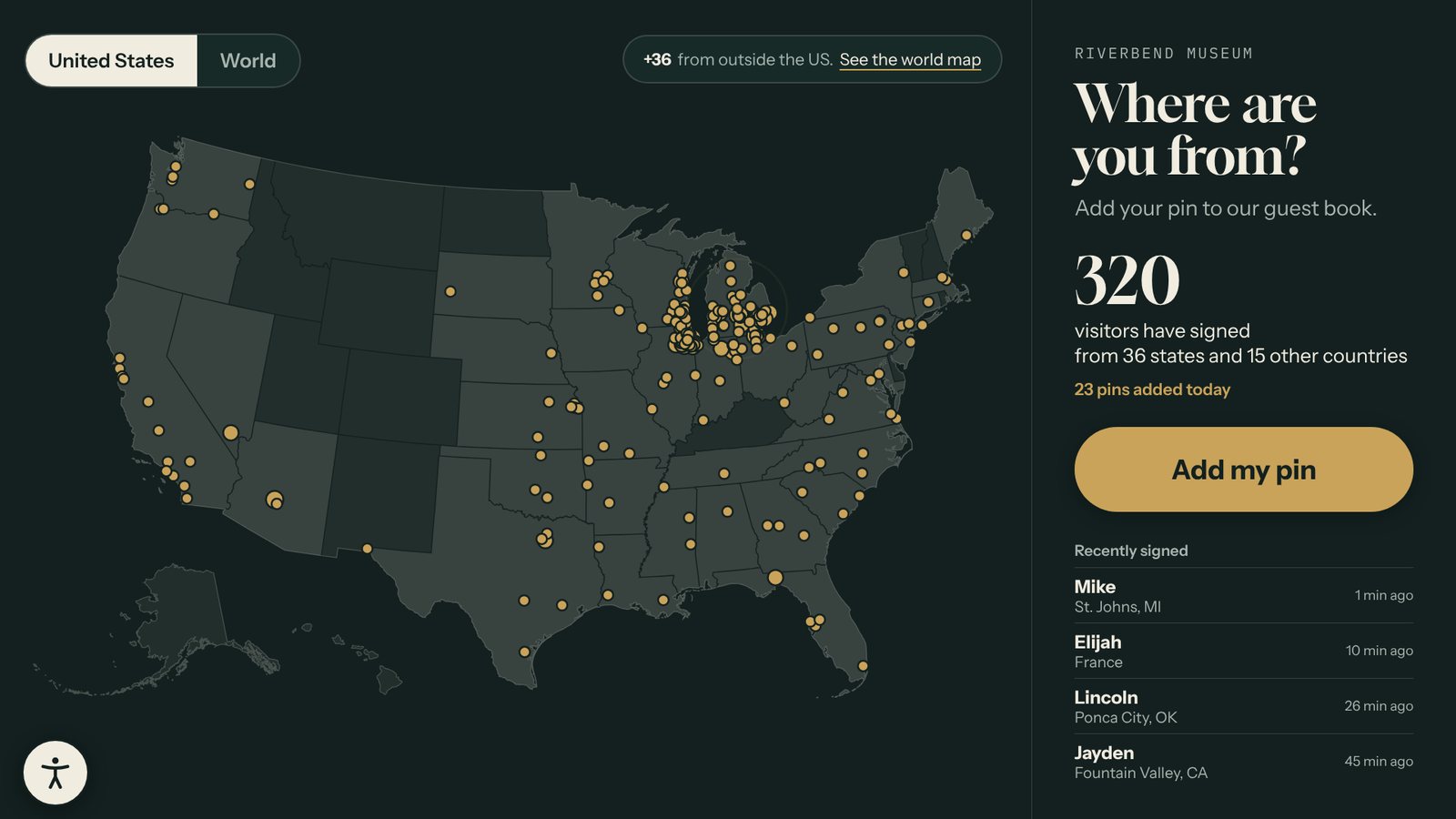
The map fills up
Each pin lands on the visitor's town. Busy towns get a bigger dot, and the newest pin pulses so people spot their own.
Lobbies, front desks, welcome centers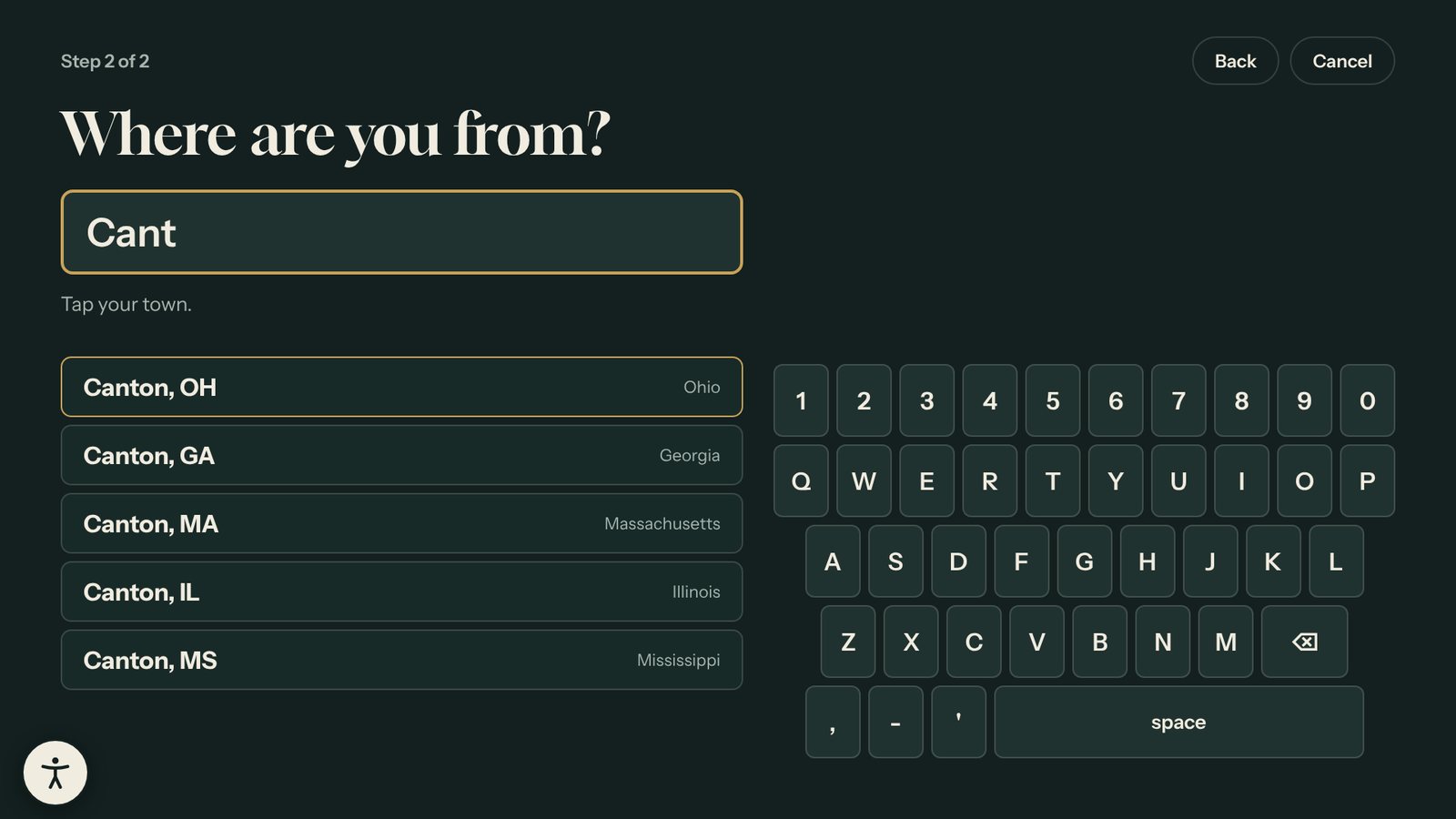
Find your town in seconds
Type a few letters or a ZIP code and pick from the list. The large on-screen keyboard is easy for all ages.
Towns, ZIP codes, cities, countries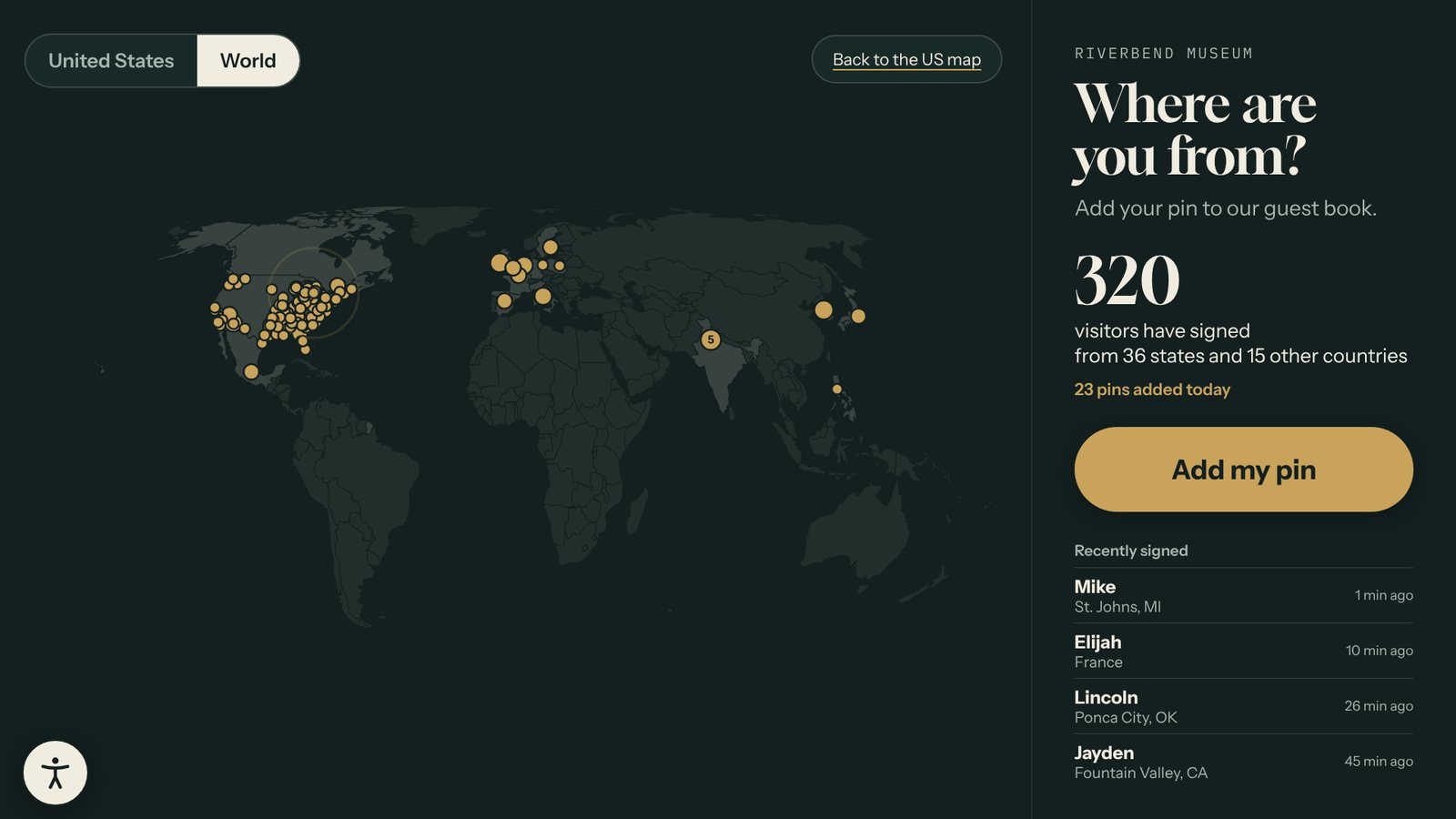
Visitors from abroad too
Switch to the world map to see international guests. The screen returns to your starting map when nobody is using it.
Tourism sites, campuses, conventionsBuilt for a busy front desk
Names you can trust on screen
A word filter checks every name on the screen and again on our server. Turn on approvals and new names wait for a quick OK, from your desk or your phone.
Counts that add themselves
The screen shows how many people signed, from how many states and countries, and who signed last. No tallying pins.
A list for your reports
Download every entry as a spreadsheet with the town, state or country, and date, ready for a board packet or grant report.
Optional email sign-ups
Add a last step that asks for an email address. Each sign-up lands in your Leads list with the visitor's town.
Keeps going offline
The town list and maps are built in. If the internet drops, new pins wait on the kiosk and send when it reconnects.
One map, every screen
Kiosks and the version on your website share the same map, so a pin added at home shows up in the lobby.
Plays on the hardware you choose
Pair any of these with a commercial touchscreen, in landscape or portrait. Hardware is not included, so you can use what you already own. See the kiosk setup guide.
Mac mini
A 2018 or newer Mac mini on macOS 13 or later. Apple silicon is recommended.
Windows PC
Any small PC that can run Windows 11, with 8 GB of memory and an SSD.
BrightSign playerNew
Plays an offline package from its SD card with a USB touchscreen. No computer needed.
From template to touchscreen in three steps
Edit in your web browser. The kiosk picks up each change by itself.
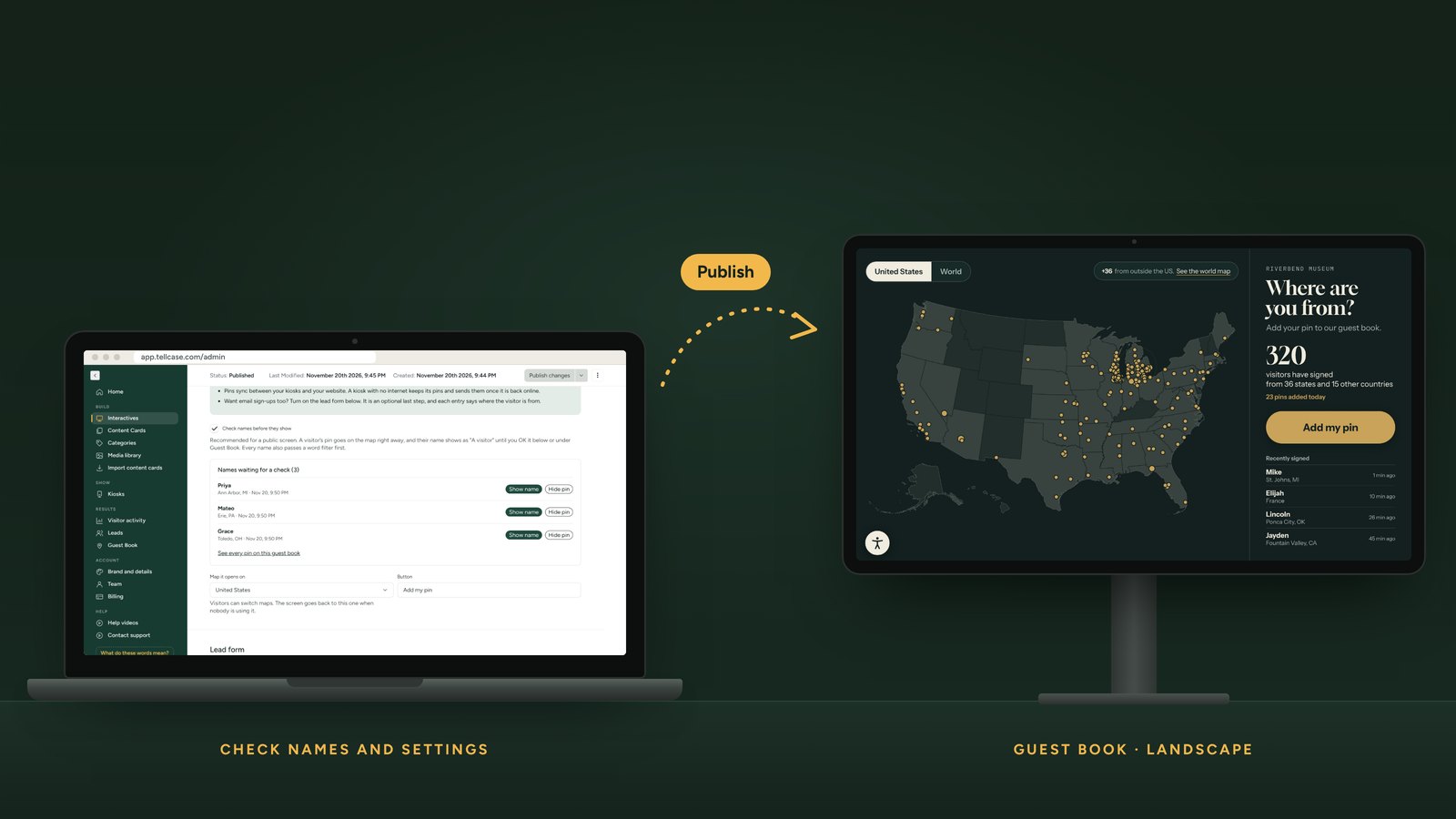
Start from the example
Open the Guest Book with sample visitors to see how it works. Your own map starts empty.
Choose your settings
Pick the US or world map, the words on the button, whether names wait for your OK, and whether to ask for an email.
Put it by the door
Pair a touchscreen kiosk with a six-digit code, or download an offline package. Add it to your website too if you like.
Part of every Tellcase plan
The Guest Book comes with all ten templates and unlimited interactives on every plan. Hardware is not included. Compare every plan.
Starter: $49 a month
One kiosk with unlimited interactives, or $490 a year. Starts with a 14-day free trial, no card needed.
Pro: $149 a month
Up to 5 kiosks, or $1,490 a year. Put a guest book in the lobby and a timeline in the gallery.
Tellcase Lifetime: $7,000 once
Up to 5 kiosks, every template, and 3 years of cloud editing, updates, and support. Your kiosks keep playing for good.
Questions about the visitor map
What is a digital guest book?
It's a touchscreen that replaces the paper sign-in book or push-pin map. Visitors add their name and hometown, and the screen shows a map of where everyone came from. Tellcase Guest Book also counts visitors by state and country and gives you a spreadsheet of every entry.
Do visitors have to give their name or email?
No. The first name is optional, and the email step is off unless you turn it on. A visitor who skips the name shows as "A visitor", and their pin still goes on the map.
How do you stop rude names from showing?
Every name passes a word filter on the screen and again on our server. With "Check names before they show" on, which is the default, each new name also waits for staff to approve it. The pin shows right away; the name appears once approved.
Can it find small towns?
Yes. The built-in list covers US cities, towns, villages, and townships, plus ZIP codes, and cities and countries around the world. If a town shares its name with others, the list shows the state so visitors pick the right one.
Does the visitor map work without internet?
Yes. The maps and town list are built in, so searching and dropping a pin work offline. New pins wait on the kiosk and send once it can reach the internet. An offline package works the same way.
Can I use the visitor data in a report?
Yes. Download every entry as a spreadsheet with the town, state or country, coordinates, and date. It opens in Excel, Numbers, or Google Sheets.
What hardware do I need?
A touchscreen with a small computer (a Mac mini or a Windows PC), a BrightSign player with a USB touchscreen, or an iPad on a stand. Our kiosk setup guide walks through each one.
Find out how far people travel to see you.
Start a free trial and put the Guest Book by your front door this week.