
Interactive exhibits for small museums and historical societies on a volunteer budget
What a touchscreen exhibit really costs a small museum or historical society, which approach fits a volunteer team, and how to build your first one in a single day.
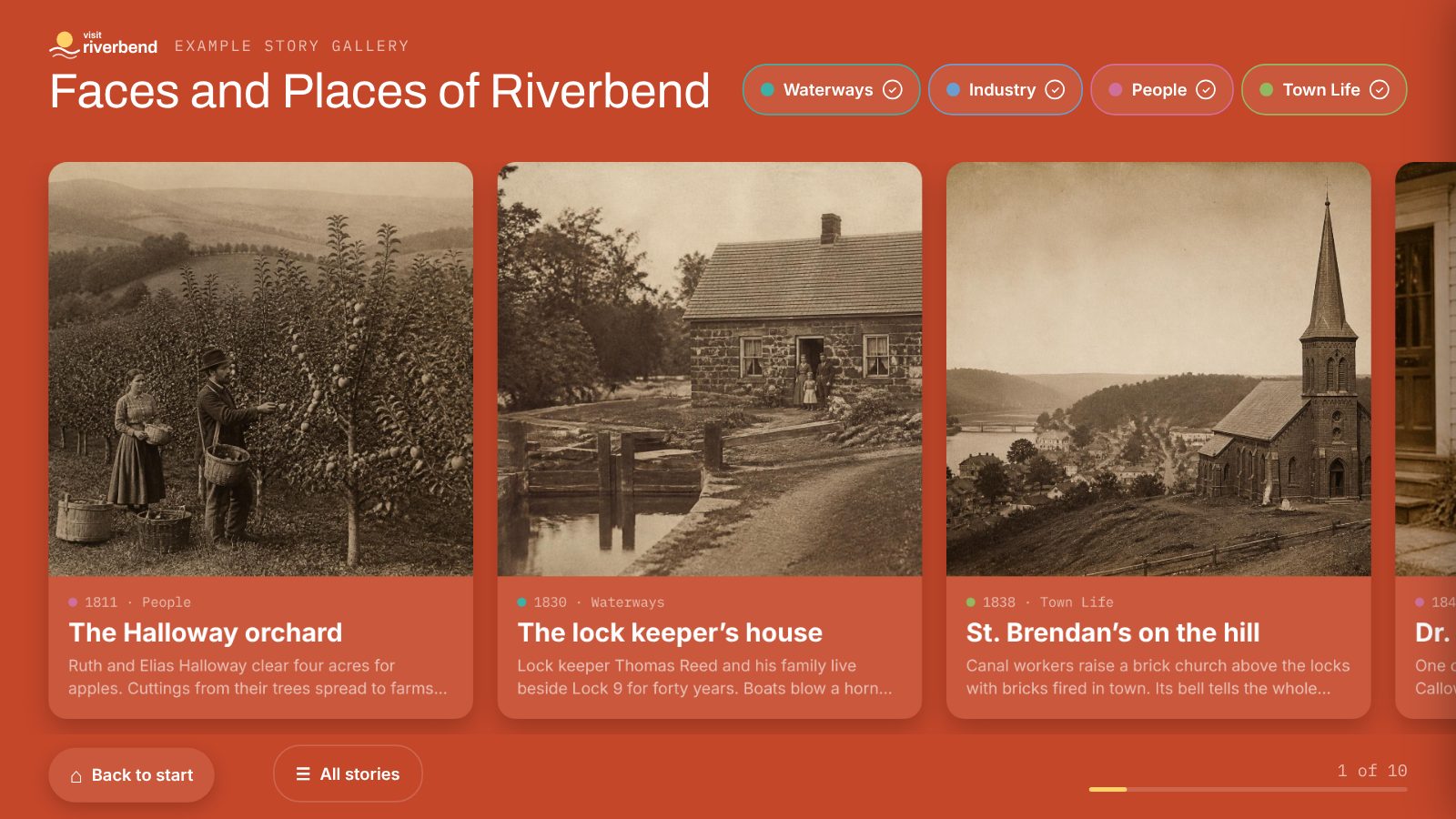
Small museums and historical societies have the best stories and the smallest budgets. A touchscreen can put a whole drawer of photos, a century of dates, or every name on a memorial in front of visitors, but the usual way to get one built was priced for a much bigger museum.
That has changed. This guide covers what an interactive exhibit actually costs, which approach fits a volunteer team, and how to build your first one in a single day.
What it costs, by approach
There are four common ways to get a touchscreen exhibit. All four need a screen and a computer, which we’ll cover next.
| Approach | Software cost | Who makes changes | Best for |
|---|---|---|---|
| Custom build from a studio | Usually $20,000 to $50,000 for a single station, plus a quote for each change | The studio, on its schedule | A one-of-a-kind game, 3D model, or room-scale piece |
| A slideshow on a TV | Little or nothing | Your staff | Announcements. Visitors can watch, but they can’t explore |
| A web page you build yourself | Free software, a lot of volunteer hours | Whoever built it | Groups with a web developer in the family |
| A template tool like Tellcase | $490 a year for one kiosk, or $7,000 once for up to 5 kiosks | Your staff and volunteers, from any browser | Timelines, collections, people, and quizzes you keep adding to |
The custom range comes from published studio budget guides, and simple kiosks can come in lower while bigger installations run far higher. The real difference between the rows isn’t the opening-day price. It’s who you have to call when a date is wrong or a family donates a better photo. For a volunteer-run museum, the answer needs to be “us.”
The hardware you need
You need three things: a touchscreen, a computer to run it, and a safe way to mount it.
- The touchscreen. A 43-inch commercial touchscreen runs roughly $750 to $2,100 at retail as of November 2026, depending on brand and build. Commercial screens are made to run all day. A 32-inch screen works for a narrow hallway, and a 55-inch suits a lobby.
- The computer. A new Mac mini starts at $799. A Windows mini PC works too. Before you buy anything, check whether a donated or retired computer will do the job. Here’s what an older computer needs.
- A small countertop option. An iPad can be a kiosk for a front desk or a small case label, as long as the building has Wi-Fi.
- The mount. A floor stand, a wall mount, or a kiosk enclosure. Keep every button visitors touch between 15 and 48 inches off the floor so wheelchair users can reach it. The accessibility checklist covers the rest.
For the full shopping list, see what you need to run a touchscreen kiosk in a museum.
Pick one story, not the whole collection
The most common mistake is trying to put everything on the first screen. Pick one question a visitor might ask, and answer it well:
- How did our town grow from a river landing into a county seat? That’s a timeline.
- Who were the families behind Main Street? That’s a story gallery.
- What’s inside this one object? That’s an object explorer, with numbered hotspots on a close-up photo.
- Who served from our township? That’s an honor wall, searchable by name.
- What do school groups remember? That’s a quiz.
You can always add a second interactive later. Every Tellcase plan includes unlimited interactives, so the first one doesn’t have to do everything.
What to gather first
Gathering is the slow part, so start before build day. For a first timeline or story gallery you’ll want:
- 15 to 40 items. Each one is a card: a date or a name, a short title, and 40 to 80 words of text.
- One good photo per card, scanned at a decent size, with a credit line and permission to use it.
- A one-line description of each photo for visitors who can’t see it. This is alt text, and it takes a minute per photo.
- One person who decides. A committee can review, but one volunteer should own the final wording.
If your dates and captions already live in a spreadsheet, keep them there. Tellcase can import a spreadsheet of cards all at once.
Build it in one day
Here’s a realistic plan for a small team with the material above already gathered.
Morning: set it up (1 hour). Start a free 14-day trial, pick a template, and look through the example cards that come with it. They show you what a finished card looks like. Add your logo and colors.
Late morning: add your cards (2 to 3 hours). Replace the example cards with yours, or import your spreadsheet. Upload photos, add alt text and credits, and group cards into eras or themes so visitors can filter.
Afternoon: test on the real screen (1 hour). Pair the kiosk, or download an offline package if the gallery has no internet. Then hand it to someone who has never seen it and watch without helping. Wherever they hesitate, fix that card.
End of day: publish. Fix anything the accessibility check at the top of the interactive flags, set how long the screen waits before returning to the start, and publish. Connected kiosks pick up the change within minutes.
Keeping it current with volunteers
A touchscreen that never changes becomes wallpaper. Plan for small, regular updates instead of a big redo:
- Give each volunteer their own login, so you know who changed what.
- Fix it from the floor. Typos and wrong dates can be fixed from a phone, and the kiosk waits for visitors to walk away before it refreshes.
- Add a card when a donation comes in. A new photo or story is a reason for members to come back.
- No Wi-Fi in the gallery? Copy a fresh package over with a USB stick. Here’s how offline exhibits work.
Try it before you ask the board
The fastest way to decide is to see one. Open the live demo and tap through a local history timeline, a story gallery, and an object explorer built for a fictional county historical society. When you’re ready to plan your own, here’s how historical societies build interactive exhibits with Tellcase, including a quote or invoice for your board.
Prices are from published price lists and retail listings checked in November 2026. They change, so confirm current prices before you budget.
Quick answers
How much does an interactive exhibit cost for a small museum?
It depends on who builds it. A custom touchscreen from a studio usually runs $20,000 to $50,000 for a single station. A template-based tool like Tellcase is $490 a year for one kiosk, or $7,000 one time for up to 5 kiosks. Either way, budget separately for a touchscreen (roughly $750 to $2,100 for a 43-inch commercial screen) and a computer, which you may already own.
Can volunteers build a touchscreen exhibit without a developer?
Yes, if the software is built for it. Look for templates that already contain example content, so a volunteer replaces photos and text instead of designing screens. If someone can fill in a web form, they can add a card.
What is the best first interactive for a historical society?
A timeline or a story gallery. Most societies already have the photos, dates, and stories, and both formats are easy to keep adding to as new donations and research come in.
Do we need Wi-Fi in the gallery?
Not with the right software. Tellcase can export an offline package you copy to the kiosk with a USB stick, and it plays with no internet at all. To update it, you copy over a fresh package.
How long does it take to build a first interactive exhibit?
If your photos and captions are already gathered, a small team can build and test a first timeline or story gallery in one day. Gathering and clearing the photos is usually the slow part, so start there.